RSS
email

0

Kesalahan Pemilihan Keyword

Kebanyakan orang kurang teliti dalam memlih keyword. Oleh karena itu untuk menghindari kesalahan dalam pemilihan keyword pastikan anda mengetahui berbagai tipe kesalahan umum yang dilakukan oleh para praktisi SEO. Berbagai tipe kesalahan tersebut antara lain:

1. Menggunakan keyword nama perusahaan atau usaha.
Umumnya jarang orang melakukan pencarian nama perusahaan. Contoh: PT Abadi Selalu Jaya Tbk. Akan tetapi lain halnya jika keyword yang digunakan adalah komputer murah, notebook, mouse, dsb.

2. Menggunakan keyword yang jarang digunakan.
Seandainya website anda menawarkan produk yang sangat segmented dan kemungkinan besar tidak dikenal orang banyak maka coba dengan keyword yang agak luas cakupannya dan sering dicari orang, karena jika kata kunci yang digunakan jarang digunakan maka kemungkinan pengunjung website juga sedikit.

3. Menggunakan keyword satu kata daripada multikata.
Sekitar 20% orang melakukan pencarian menggunakan satu kata, padahal kenyataan menurut statistik sekitar 33% pencarian menggunakan kombinasi dua kata, sementara 26% menggunakan kombinasi tiga kata dan 21% menggunakan kombinasi empat kata lebih. Oleh karena itu, logis jika pencarian satu kata jarang dilakukan karena umumnya hasil yang diperoleh menjadi kurang jelas.

4. Menyalin keyword dari kompetitor mentah-mentah.
Hal ini merupakan teknik yang kurang optimal karena bisa jadi keyword yang digunakan kompetitor juga dalam posisi kurang optimal dan atau website kita jarang dikunjungi karena tergolong masih baru dan kalah posisi dengan kompetitor kita.

5. Terlalu banyak menggunakan keyword dalam halaman.

Ini disebut keyword stuffing atau keyword spamming. Konsekuensi dari hal ini adalah pembaca menjadi pusing dan tidak nyaman dalam membaca halaman tersebut. Selain itu google juga sudah memiliki alat pendeteksi spam yang memungkinkan google untuk memblokir website anda. Lebih baik anda menggunakan sinonim kata-kata yang mempunyai makna relevan dan bukan satu kata keyword yang diulan-ulang.


[...]
0

How to Create a Blogger Feed

1. Enter your blog's web address in the "Ready to Burn?" form found on FeedBurner's homepage and at the bottom of the pages in the Blog and Podcast sections. If you plan to publish a podcast with your Blogger feed, check the "I am a podcaster" box. Click Next ».

The Identify Feed Source page should appear.

2. On "Welcome", make sure the title and FeedBurner address (URL) of your new feed are values you prefer.


The Create or Sign In To Your FeedBurner Account page should appear.

3. Also on this page, create a FeedBurner account by picking a username and password and supplying your email address.

When you've supplied all the required information on this page, click Activate Feed ». A "Congrats" page should appear.

4. Read all of the information on "Congrats", then click Next » to continue with the setup process.

5. If you selected "I am a podcaster" on the homepage, configuration options for our SmartCast service will appear. Here you can supply categories and other information for iTunes, append a copyright message, and submit your podcast to Yahoo! Search.


When you are finished, click Next ». Configuration options for FeedBurner stats services should appear.

6. On the stats configuration page, select the level of feed stats detail you want.


Click Next » to finish the setup process and enter our feed management interface.

You're now ready to make your FeedBurner feed available on your Blogger site!


[...]
0

How to Add your Blogger blog on MSN

Finally this is the end of serial post how to submit your blog to searc engine. Now i will show you how to add and verify your blogger blog on MSN. This is the step:
1. Sign into Windows Live with your Windows Live ID (Hotmail ID)
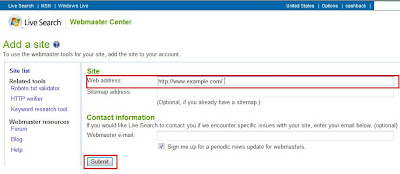
2. On the Webmaster Center, type the site URL in the Web address field. Make sure you type the entire URL, such as http://www.example.com/

3. Click Submit.

MSN,webmaster live, tools
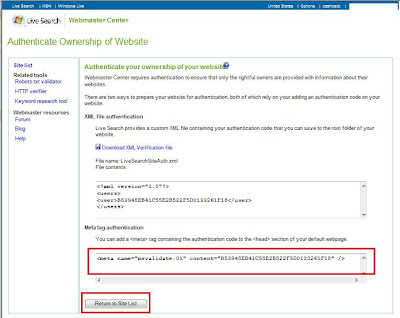
4. From the Authenticate Ownership of Website page select “Meta tag authentication" Copy the whole tag.

msn meta tag
5. Open the Edit HTML mode from the blogger’s Layout Editor. Paste the Meta Tag you just copied immediately under the tag "head". Save the template.

msn meta tag
6. Go back to Authenticate Ownership of Website page and click on the "Return to Site List" button.
7. From the Site List page click your web address to check whether the verification step is completed.


See you on another time.


[...]
0

How to Add your Blogger blog on Yahoo

Last post i had wrote about how to add and verify your blogger blog on google. As serial post now i will show you how to add and verify your blogger blog on Yahoo. This is the step:
1. Sign into Yahoo Site Explorer with your Yahoo Account
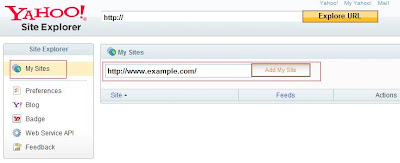
2. From the Site Explorer click My Sites.

3. Type the site URL in the Add My Site Field. Make sure you type the entire URL, such as http://www.example.com/ and then click Add My Site.

4. Click on the yellow button under the Status.

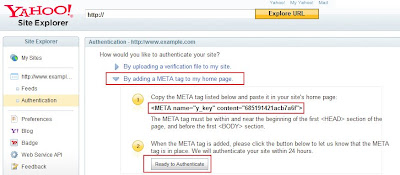
5. From the Authentication page select “by adding a META TAG to my home page" Copy the whole tag.
yahoo submit your site
6. Open the Edit HTML mode from the blogger’s Layout Editor. Paste the Meta Tag you just copied immediately under the tag "head". Save the template.

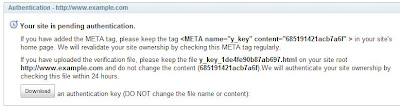
7. Go back to Yahoo Site Explorer and click on the "Ready to Authenticate" button. (It might take a few hours to get your status updated)

Next How to Add your Blogger blog on MSN


[...]
0

How to Add your Blogger blog on Google

To get your website or blog pages more crawling and indexing by search engine, it's very important to get authenticated from search engine so you must submit and verify your blog to search engine for best performing in the search result. The best thing you can tell about the pages on your site by submitting a sitemap. This time SEO Tutorial is about how your blogger blog get authenticated to Google, Yahoo and MSN(Live)

How to add and verify your Blogger blog on Google:
1. Sign into Google Webmaster Tools with your Google Account.
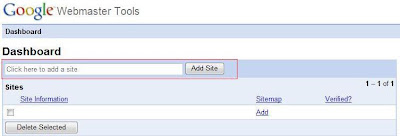
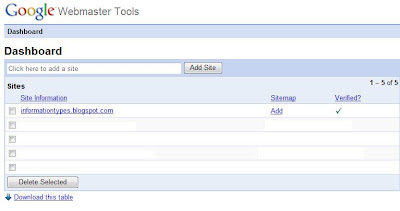
2. On the Dashboard, type the site URL in the Add site field. Make sure you type the entire URL, such as http://www.example.com/ and then click Add Site.
google dashboard
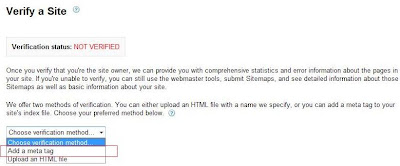
3. Click on Verify your site link.
verify google
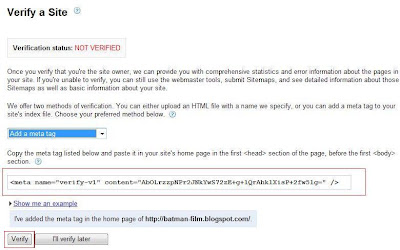
4. Select Add a meta tag as the verification method.
add meta tag, google
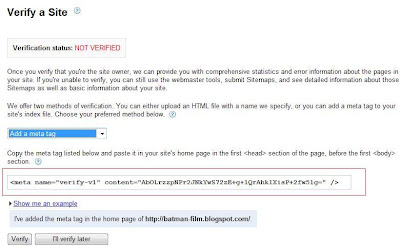
5. Copy the meta tag.
google meta tag
6. Open the Edit HTML mode from the blogger’s Layout Editor. Paste the meta tag you just copied immediately under the tag "head". Save the template and go back to Google Webmaster Tools.
meta tag to blogger
7. Click on the Verify button.
click verify button, google
8. Go back to dashboard in Google Webmaster Tools and check whether the verification step is completed. It might take a few minutes to get your status updated.
google verified
Hopefully useful,


[...]
Related Posts Plugin for WordPress, Blogger...
Sign up for PayPal and start accepting credit card payments instantly.

Dapatkan Info Artikel Terbaru Via Email. Daftar Alamat Email Anda:

Gratis Ebook untuk tiap Daftar Email

Duta OnlineDuta OnlineDuta Online

Publikasi Oleh : Duta Online | My Ping

Photobucket"Copied this HTML code into your own blog or web template as a shortcut"


Your Adsense

Kotak Iklan Kotak Iklan Kotak Iklan Kotak Iklan

Blog Partner

SEO tutorial, google adsense, bisnis internet, toko belanja online, product review, business review, investment review, tips blackberry, keyword, harga emas, gold price, health insurance, gratis ebook Blog Directory Literature & Writing - TOP.ORG Business Business Blogs Top Show all blogs Business Blogs - Blog Rankings Free Automatic Backlink top backlinks referers free DTOnline46 DTOnline46 DTOnline46 Topsites @CianjurCyberCity http://Link-exchange.comxa.com My Zimbio internet connection speed test dtonline46.blogspot.com

Statistik

SEO Stats powered by MyPagerank.Net

Powered by Olark